Google Cloud Messaging in android


First of all what is this Google Cloud Messaging or simply GCM?
*As for the Google introduction  “Send data from your server to your users' devices, and receive messages from devices on the same connection. The GCM service handles all aspects of queuing of messages and delivery to client applications running on target devices, and it is completely free.”
Derived from above phase GCM is a free, server based messaging service which can be used  for either sending downstream messages such as “push notifications” or sending and receiving messages which can be implemented as a simple chat application or whatever the need you have.
Before going on deep I should say that this article is a bit technical for the newbies for android and server programming but don’t get behind, once you learnt the basics, those things are not much harder to learn.
How is it works?
There are 2 ways to use GCM,
1.    Use only for downstream messages such as push notifications
2.    Use for both upstream and downstream messages using GCM connection server
  

Why GCM?

·         The main advantage of GCM over other alternatives is its completely free.
·         You don’t have to worry above certain things such as queuing, late delivery, GCM will take care of all these.
·         GCM supports up to 4KB payload so you can send more data.
·         GCM is easy to implement so you don’t need to do much coding.
  

GCM for Downstream messages

  
Here we can only send downstream messages to a device, this kind of implementations are widely used in “push notification sending systems”.

Before doing anything dramatic we need to setup our android studio project to use with GCM.
Here are the steps you need to follow to setup your project correctly
1.    Set up Google play services
2.    Edit your Application’s manifest
3.    Create a project in Google application console https://console.developers.google.com

Above steps are explained in detail here

If you have done all the things correctly as I mentioned above, you have successfully configured your project.

Then to communicate with GCM server you have to obtain an “InstanceID” token. this InstanceID token will uniquely identify the device. This is kind of registering your devices in GCM database.

InstanceID instanceID = InstanceID.getInstance(this);
String token =instanceID.getToken(Google Project ID,
       
GoogleCloudMessaging.INSTANCE_ID_SCOPE, null);
Here Google Project ID is a unique identifier you get when you created a project in Google Application console.
Getting an InstanceID might block your UI thread so make sure you do it in a Separate thread.
Save above token in a persistence manner to use again.
You have completed the basic steps, so the device configuration is done. Now you have to make a server to connect your device with GCM server.
I’m not going to cover the all aspects of creating the server. You can find all those details in their developer guide.
You can create the server using HTTP or XMPP but just remember that HTTP one is only working with downstream messages, if you need to implement upstream messages as well, you have to go with the XMPP server which is my personal favor as well.
Assuming that the server implementation is complete now you have to create a way to catch the messages which are being send from the server.to achieve that we can use below code.
To receive simple downstream messages, use a Service that extends GcmListenerService to handle messages captured by GcmReceiver. GcmReceiver extends WakefulBroadcastReceiver, guaranteeing that the CPU is awake so that your listener service can complete its task.
By overriding the method GcmListenerService.onMessageReceived, you can perform actions based on the received message:
 @Override

public void onMessageReceived(String from, Bundle data) {

    String message = data.getString("message");

    Log.d(TAG, "From: " + from);

    Log.d(TAG, "Message: " + message);


    if (from.startsWith("/topics/")) {

        // message received from some topic.

    } else {

        // normal downstream message.

    }


    // ...

}
After receiving the messages you can choose the action based on the message. 
GCM for Upstream and downstream messages


As I mentioned above we have to use XMPP if we are going to implement bidirectional messaging.
You can find how to implement the XMPP server here:

You have to repeat all the steps we have done in downstream only method and need to do some new steps also.


1.    Create a method to send upstream messages

public void onClick(final View view) {
   
if (view == findViewById(R.id.send)) {
       
new AsyncTask() {
           
@Override
           
protected String doInBackground(Void... params) {
               
String msg = "";
               
try {
                   
Bundle data = new Bundle();
                    data.putString(
"my_message", "Hello World");
                    data.putString(
"my_action","SAY_HELLO");
                   
String id = Integer.toString(msgId.incrementAndGet());
               gcm.send(
Google Project ID + "@gcm.googleapis.com", id,data);
                    msg =
"Sent message";
                }
catch (IOException ex) {
                    msg =
"Error :" + ex.getMessage();
                }
               
return msg;
            }

           
@Override
           
protected void onPostExecute(String msg) {
                mDisplay.append(msg +
"\n");
            }
        }.execute(
null, null, null);
    }
else if (view == findViewById(R.id.clear)) {
        mDisplay.setText(
"");
    }
}
make sure to do above code in a separate thread.

Here “send” method in  “GoogleCloudMessaging” object will responsible to send the message.

The objective of this post is to give you an introduction about what is GCM and how it works.to learn more about this you can follow their official developer guide.


I can’t cover all the steps in detail here in this post because this one is just an Introduction but I’ll make another post about how we can actually implement this using relevant code. Until then Happy Coding.


Chathuranga Sandaruwan

Green Computing

Green Computing

What is Green Computing

  • •Simply Green Computing is the process of using computers & their resources in an eco-friendly manner.
  • •In broader terms ,it is defined as the study of designing,manufacturing/engineering,using & disposing of computing devices in a way that reduces their environmental impact.

How HackerRank is useful for students


HackerRank (Previously InterviewStreet) is a website that ranks Programmers by Challenges. Normally HackerRank provides these Services:-

Capability of organizing code challenges:-

We can use HackerRank for make challenges (CodeSprints), also we can make private challenges for targeted specific group. 

Yes, it works as a Platform for Hackathons .We can make private challenge with specific group of people and distribute Code Challenges and sample Test cases to check the code via HackerRank and let them submit their codes to HackerRank. Challenge organizer can check these submissions and review those codes and rank them in a leaderboard. 

Also you can make a public contest for programmers around the world.

Capability of Rank Your Knowledge:-

With HackerRank you can check your knowledge level with your other Programmers in different aspects such as Algorithm, Functional Programming, Artificial Intelligence, Security, and Database Systems. Or you can check your knowledge in specific Programming Language such as: Java, C++, Python, Ruby and etc. 

And you can check your place in leaderboard.

Help companies to recruit best programmers:-

This method is highly using in India for recruit programmers. Most of companies such as: Adobe using HackerRank for recognize talented programmers who has good logical thinking and who are following Best practices and Standards. Some companies  organize HackerRank contests and give away some amazing prizes such as: money, Products, T-shirts to motivate programmers.

Visit HackerRank.com ( www.hackerrank.com )

Isuru Abeywardana
CIS 2012/2013

Awesome software you might not know

Listed below, are some of the software programs which are quite well known among Linux users but not so much in the Windows realm. All of them are free which you can download and install freely.

F.lux


f.lux is a free software utility that adjusts both the brightness and tint to warm up your computer display, to match your indoor lighting. Thus reducing eye strain which helps you sleep better. Once used to, it is probably going to be the program that you cannot live without. It is a lifesaver for those who staring at a bright screen late at night. If your're Linux user there is a better alternative called redshift which you can typically find in the official repositories sudo apt-get install redshift

Kodi


Formerly known as XBMC is an award-winning media center/player. The way it automatically fetches, and present information about the media content on your hard disk is out of this world. Things like downloading a subtitle for a movie is no more than two clicks away, not surprising given the highly customizable and extensible nature of the software. So why use ad bloated software like KMP, when better, cross-platform, open source alternatives like Kodi is freely available? Ubuntu-based Installation sudo apt-get install software-properties-common sudo add-apt-repository ppa:team-xbmc/ppa sudo apt-get update sudo apt-get install kodi Windows and, Mac OS X users can just download and install the binary executable from kodi.tv/download/

Rythmbox

A very easy to use, elegant music player for music management and playback. A few features to note:

   1)  Read and display tracks with meta-data
   2)  Static and automatic playlists
   3)  Retrieve information about tracks directly from the web
   4)  Extensible with Plugins
   5)  Podcasts
   6)  Embed/export cover arts
   7)  Burn Audio CDs from playlists.

Inkscape Vector Graphics Editor

Inkscape is a highly capable cross-platform scalable vector graphics editor similar to Adobe Illustrator used in various personal, as well as in professional design work.


Yumi

Helps turn your USB flash drive into a system rescue powerhouse by letting you boot into multiple OSs, antivirus tools, diagnostic utilities in a single USB stick. For example in a single pen drive you can include,

 1)  Ubuntu
 2)  Fedora
 3)  Kaspersky Rescue Disk
 4)  Windows 7/8/10 Installer ... just to name a few.


Gayan Sajith
CIS 2012/2013
LinkedIn

jQuery “write less, do more”


 I’m writing this article just to give a little boost for who are interested in web development. Basically most of us have the knowledge on HTML, JavaScript and CSS.  No bothers for others, it is easy to learn those.
HTML- A markup language to describe web documents using markup tags to describe different document contents.
CSS- Defines how HTML elements are displayed adding styles.
JavaScript-  An Object Oriented programming language adds client side behavior to the HTML page.

What is jQuery?
jQuery is a JavaScript library. Simply calling a method will deduct many lines of codes.
It has following features:

   1)   HTML/DOM manipulation
   2)   CSS manipulation
   3)   HTML event methods
   4)   Effects and animations
   5)   AJAX
   6)   Utilities

Some other JavaScript libraries are Angular.js , Ember , React , Ace , Reveal.js , Three.js
But the best thing about jQuery is it works for almost all the browsers and also many big web companies use jQuery, such as Google, Microsoft, IBM, Netflix.

Let’s start..

So I hope now you are with a little idea about this jQuery. Let’s give it a simple start,

First download a copy of jQuery from Download jQuery. Never mind if it is which version. Rename the jQuery file to jquery.js(Not recommended.Just use your jQuery file name instead of jquery.js in next steps) and place it in where your html file is(if not you have to set the path) .
Next link the jQuery file. No doubt now you know where we should do this. It is inside script tags.


<script src="jquery.js"></script>

Where should we place the script tag?

 The old approach is to put it before the </body> tag. Because scripts block parallel downloads, while a script is downloading browser won’t start any other downloads. But this also affects for the performance with large scripts and stylesheets. Today browsers support async and defer attributes inside script tags. They tell the browser parsing the document is safe and do not block the browser. So can be placed inside the head tag.


<script src="jquery.js" async></script> or
<script src="jquery.js" defer></script>

Basic syntax is:  $(selector).action()
Mostly the jQuery methods are inside a document ready event.
Both these implies the same action.

 <script>  
 $(document).ready(function(){  
   // jQuery methods go here...  
 });  
 </script>  
OR
 <script>  
 $(function(){  
   // jQuery methods go here...  
 });  
 </script>  

This is a simple complete example to understand the functionality of jQuery:
 <html>  
 <head>  
      <script src="jquery.js"></script>  
 <script type="text/javascript">  
 $(document).ready(function(){  
  $("#divID").html("This is Hello World by JQuery");  
  $('#changeStyle').click(function (){  
    $('#changeStyle').css({  
      'padding':'7px',  
      'background-color':'darkcyan',  
      'font-size':'18px',  
      'color':'white',  
      'border-radius':'10px'  
    })   
  })  
  $("#alertBtn").click(function (){  
    alert('Hello jQuery');  
  })  
 });  
 </script>  
 </head>  
 <body>  
 This is Hello World by HTML  
 <div id="divID">  
 </div><br>  
 <input type="button" id="changeStyle" value="Click to Change"><br>  
 <input type="button" id="alertBtn" value="Alert">  
 </body>  
 </html>  


A class selector is a name preceded by a full stop (“.”) and an ID selector is a name preceded by a hash character (“#”).


Hope you enjoyed this article. I have provided some links below to follow by jQuery beginners. Find more, add colors to your web page!

Chathurika Senani
CIS 2012/2013
LinkedIn


SKILLS AND QUALITIES REQUIRED TO BE A GREAT BUSINESS ANALYST

Core Skills

Communication Skills

    Must be good communicator.
    Facilitate working meetings, ask good questions, really listen to the answers, and absorb what is being said.


Problem-Solving Skills

    The entire project is a solution for a problem.
    Facilitate a shared understanding of the problem, the possible solutions, and determine the scope of the project.


Critical Thinking Skills

    Responsible for evaluating multiple options.
    While discovering the problem to be solved, must listen to stakeholder needs.
    Critically consider those needs and ask probing questions until the real need is understood.


Business Analysis Skills

Documentation and Specification Skills

    Ability to create clear and concise documentation.
    Creates requirements documents.


Analysis Skills

    Uses a variety of techniques to analyze the problem and the solution.
    E.g. Use cases, Business Process Models, Decision Models.
    Identifies the downstream impact of a change or new solution.


Visual Modeling

    Ability to create visual models, such as work-flow diagrams or wireframe prototypes.
    Important to be able to capture information visually – whether in a formal model or a napkin drawing.


Facilitation and Elicitation Skills

    Facilitates specific kinds of meetings.
    Most common kinds of elicitation sessions are interviews and observations.
    More advanced roles, the meetings are called “JAD sessions” or “requirements workshops.”


Business Analysis Tools

    Ability to use basic office tools such as Word, Excel, and PowerPoint.
    Ability to use modeling tools, (e.g. Visio or Enterprise Architect), requirements management tools, (e.g. DOORS or Caliber) or project and defect management tools.


Soft Skills

Relationship-Building Skills

    Ability to build strong relationships, often called “stakeholder relationships”.
    This skill involves building trust.


Self-Managing

    The most successful BAs manage the business analysis effort.
    Manages themself to commitments and deadlines.


A Thick Skin

    Receives a barrage of feedback – on their documentation and proposed solutions.
    Able to separate feedback on his documents and ideas from feedback on his personally.


A Paradoxical Relationship with Ambiguity

    Ambiguities in requirements specifications lead to unexpected defects.
    Ambiguities in conversation lead to unnecessary conflict.
    At every stage of a project, can be found a BA clarifying and working out ambiguities.
    At the beginning of a project, before the problem is totally understood and the solution is decided upon, a BA must be able to embrace the ambiguity and work effectively through ambiguity.


Aloka Perera
alokabperera@gmail.com Send Mail

What is Microsoft Virtual Academy


What is Microsoft Virtual Academy?
 
           Microsoft Virtual Academy or MVA is a fully cloud based learning experience focusing on Microsoft Technologies. Especially it is a no cost online training for all Developers, IT professionals and students and etc. Structure is basically similar to a virtual university. 


What they provide to us?


            Students can select the course they want with the helping materials. And end of the course they will be awarded with bronze, silver and gold points according to their marks, also they can improve their rankings in the worldwide and local top students list. 


Why is MVA so special?


            This is free of charge, and you can study the contents at any time and at your own pace. They have hosted on the latest Microsoft Azure technology, which guarantees that you’re learning experience will flow uninterruptedly for one of the best online learning experiences ever.


Who is eligible to participate in MVA?

 
             People who are interested can join with MVA and they will be provided a live ID to access the courses. No big technical knowledge required.


What are the benefits for the students?


⦁    No cost training with latest Microsoft technologies
⦁    Easy to select the course with the interest
⦁    Points are given which are recognized by IT professionals
⦁    Provide a virtual world to acquire new skills 


 Rasitha Ariyarathna
 CIS 2012/2013

‘Windows Bridge For iOS’ To Help iOS Developers With App Portability


What is WinObjC?

                Microsoft has released software to reduce the gap between Windows applications and apps for Apple's iOS mobile platform which is nicknamed as WinObjC.

Why University Students want LinkedIn.


This is my very first post on MAG-CIS. I’m going to demonstrate on this post, what is LinkedIn and Why University Students want LinkedIn.

What is LinkedIn?
LinkedIn is a Web Site which is same as Facebook. Yes, it is like a social media network but, a professional network. We can make a profile, add our professional content and our bio data to it. So it works as our online CV. LinkedIn has more than 347 million members in over 200 countries.

Why LinkedIn:
When we have made the LinkedIn profile we can connect with professionals and organizations and it will help you to get a job after your graduation or while you’re studying. It is one of the opportunities of LinkedIn. Let’s see what others are.

This is how University Students can get benefits from LinkedIn:

Getting Job Alerts:
After we create a LinkedIn profile we can choose the fields which we are interested in. If there is a vacancy in an organization they post it on LinkedIn .We can see those Jobs through LinkedIn. If you are willing to do a job overseas, you can get lot of benefits from the Linked network.

Connecting With Professionals:
Students can connect with neighbors, friends and family members professionally. These connections sometimes make opportunities.

Getting Recommendations:
In LinkedIn there is a feature to recommend others skills. Students who have maximum number of recommendations will get more attention from employers.

Letting companies find you:
Employers are always looking for talented employees. Therefore they are searching for talented employees in LinkedIn. If there is a student with bunch of successful projects, skills and recommendations employers will offer a job as soon as he/she gets graduated.

Letting you find companies:
This is one of the biggest benefits that LinkedIn offers. You can visit interested companies and connect with the employees of those organizations and it will be helpful to know about the hiring process of the companies.

Let’s make a LinkedIn profile earlier as possible and stay ahead of the competition.

Isuru Abeywardana
CIS 2012/2013

How to become a Full Stack Developer


Who is a Full Stack Developer?

A developer who is comfortable in developing both the back end and the front end. That is someone who knows how to deal with databases, PHP, HTML, CSS, JavaScript and everything in between.

Breaking the technology stacks

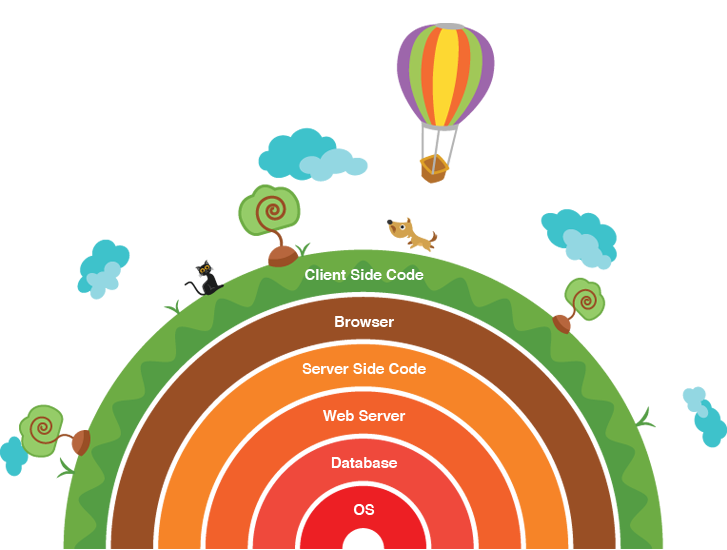
As shown in the figure, there are many technology stacks. The things inside those technology stacks are as follows.

System Administration

1.       Linux and basic shell scripting
2.       Cloud computing: Amazon, Rackspace, etc.
3.       Background processing: Gearman, Redis
4.       Search: Elasticsearch, Sphinx, Solr
5.       Caching: Varnish, Memcached, APC / OpCache
6.       Monitoring: Nagios

Web development tools

1.       Version control: Git, Mercurial, SVN
2.       Virtualization: VirtualBox, Vagrant, Docker

Back end tech

1.       Web servers: Apache, Nginx
2.       Programming language: PHP, NodeJS, Ruby
3.       Database: MySQL, MongoDB, Cassandra, Redis, SQL / JSON in general

Front-end tech

1.      HTML / HTML5: Semantic web
2.       CSS / CSS3: LESS, SASS, Media Queries
3.       JavaScript: jQuery, AngularJS, Knockout, etc.
4.       Compatibility quirks across browsers
5.       Responsive design
6.       AJAX, JSON, XML, WebSocket

Design

1.      Converting website design into front-end code
2.       UI
3.       UX

Mobile

1.       iOS
2.       Android
3.       Windows mobile
4.       Hybrid: PhoneGap, Appcelerator

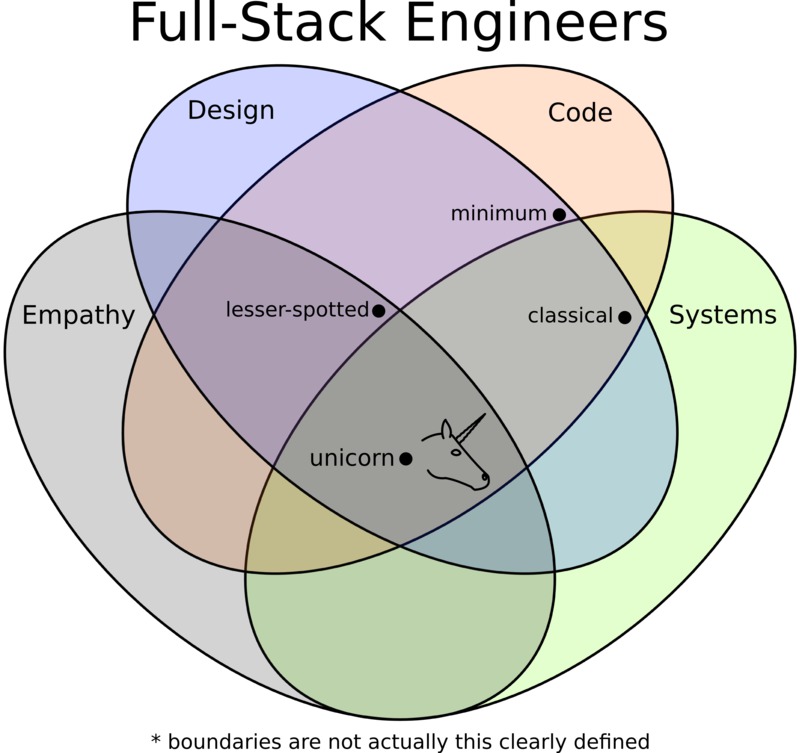
The unicorn


To be a full stack developer you should have empathy in you. That is you have to be able to see in some other person’s view. You need to have creativity and ability to plan. So that you have the design skills. Obviously you have to code. That includes building the software, version controlling, testing etc. apart from those systems knowledge should be there for storing, accessing and transferring data.
All these disciplines make you a successful full stack developer; a unicorn!

Be a full stack developer or not?

For a full stack developer, it is not needed to specialize one thing. That is not possible as he/she is an all-rounder. But should be comfortable with all the technologies to work with. To be comfortable in every technology is also kind of being an expert.

Kashumi Madampe
CIS 2010/2011
kashumi91@gmail.com