Green Computing

Green Computing

What is Green Computing

  • •Simply Green Computing is the process of using computers & their resources in an eco-friendly manner.
  • •In broader terms ,it is defined as the study of designing,manufacturing/engineering,using & disposing of computing devices in a way that reduces their environmental impact.

How HackerRank is useful for students


HackerRank (Previously InterviewStreet) is a website that ranks Programmers by Challenges. Normally HackerRank provides these Services:-

Capability of organizing code challenges:-

We can use HackerRank for make challenges (CodeSprints), also we can make private challenges for targeted specific group. 

Yes, it works as a Platform for Hackathons .We can make private challenge with specific group of people and distribute Code Challenges and sample Test cases to check the code via HackerRank and let them submit their codes to HackerRank. Challenge organizer can check these submissions and review those codes and rank them in a leaderboard. 

Also you can make a public contest for programmers around the world.

Capability of Rank Your Knowledge:-

With HackerRank you can check your knowledge level with your other Programmers in different aspects such as Algorithm, Functional Programming, Artificial Intelligence, Security, and Database Systems. Or you can check your knowledge in specific Programming Language such as: Java, C++, Python, Ruby and etc. 

And you can check your place in leaderboard.

Help companies to recruit best programmers:-

This method is highly using in India for recruit programmers. Most of companies such as: Adobe using HackerRank for recognize talented programmers who has good logical thinking and who are following Best practices and Standards. Some companies  organize HackerRank contests and give away some amazing prizes such as: money, Products, T-shirts to motivate programmers.

Visit HackerRank.com ( www.hackerrank.com )

Isuru Abeywardana
CIS 2012/2013

Awesome software you might not know

Listed below, are some of the software programs which are quite well known among Linux users but not so much in the Windows realm. All of them are free which you can download and install freely.

F.lux


f.lux is a free software utility that adjusts both the brightness and tint to warm up your computer display, to match your indoor lighting. Thus reducing eye strain which helps you sleep better. Once used to, it is probably going to be the program that you cannot live without. It is a lifesaver for those who staring at a bright screen late at night. If your're Linux user there is a better alternative called redshift which you can typically find in the official repositories sudo apt-get install redshift

Kodi


Formerly known as XBMC is an award-winning media center/player. The way it automatically fetches, and present information about the media content on your hard disk is out of this world. Things like downloading a subtitle for a movie is no more than two clicks away, not surprising given the highly customizable and extensible nature of the software. So why use ad bloated software like KMP, when better, cross-platform, open source alternatives like Kodi is freely available? Ubuntu-based Installation sudo apt-get install software-properties-common sudo add-apt-repository ppa:team-xbmc/ppa sudo apt-get update sudo apt-get install kodi Windows and, Mac OS X users can just download and install the binary executable from kodi.tv/download/

Rythmbox

A very easy to use, elegant music player for music management and playback. A few features to note:

   1)  Read and display tracks with meta-data
   2)  Static and automatic playlists
   3)  Retrieve information about tracks directly from the web
   4)  Extensible with Plugins
   5)  Podcasts
   6)  Embed/export cover arts
   7)  Burn Audio CDs from playlists.

Inkscape Vector Graphics Editor

Inkscape is a highly capable cross-platform scalable vector graphics editor similar to Adobe Illustrator used in various personal, as well as in professional design work.


Yumi

Helps turn your USB flash drive into a system rescue powerhouse by letting you boot into multiple OSs, antivirus tools, diagnostic utilities in a single USB stick. For example in a single pen drive you can include,

 1)  Ubuntu
 2)  Fedora
 3)  Kaspersky Rescue Disk
 4)  Windows 7/8/10 Installer ... just to name a few.


Gayan Sajith
CIS 2012/2013
LinkedIn

jQuery “write less, do more”


 I’m writing this article just to give a little boost for who are interested in web development. Basically most of us have the knowledge on HTML, JavaScript and CSS.  No bothers for others, it is easy to learn those.
HTML- A markup language to describe web documents using markup tags to describe different document contents.
CSS- Defines how HTML elements are displayed adding styles.
JavaScript-  An Object Oriented programming language adds client side behavior to the HTML page.

What is jQuery?
jQuery is a JavaScript library. Simply calling a method will deduct many lines of codes.
It has following features:

   1)   HTML/DOM manipulation
   2)   CSS manipulation
   3)   HTML event methods
   4)   Effects and animations
   5)   AJAX
   6)   Utilities

Some other JavaScript libraries are Angular.js , Ember , React , Ace , Reveal.js , Three.js
But the best thing about jQuery is it works for almost all the browsers and also many big web companies use jQuery, such as Google, Microsoft, IBM, Netflix.

Let’s start..

So I hope now you are with a little idea about this jQuery. Let’s give it a simple start,

First download a copy of jQuery from Download jQuery. Never mind if it is which version. Rename the jQuery file to jquery.js(Not recommended.Just use your jQuery file name instead of jquery.js in next steps) and place it in where your html file is(if not you have to set the path) .
Next link the jQuery file. No doubt now you know where we should do this. It is inside script tags.


<script src="jquery.js"></script>

Where should we place the script tag?

 The old approach is to put it before the </body> tag. Because scripts block parallel downloads, while a script is downloading browser won’t start any other downloads. But this also affects for the performance with large scripts and stylesheets. Today browsers support async and defer attributes inside script tags. They tell the browser parsing the document is safe and do not block the browser. So can be placed inside the head tag.


<script src="jquery.js" async></script> or
<script src="jquery.js" defer></script>

Basic syntax is:  $(selector).action()
Mostly the jQuery methods are inside a document ready event.
Both these implies the same action.

 <script>  
 $(document).ready(function(){  
   // jQuery methods go here...  
 });  
 </script>  
OR
 <script>  
 $(function(){  
   // jQuery methods go here...  
 });  
 </script>  

This is a simple complete example to understand the functionality of jQuery:
 <html>  
 <head>  
      <script src="jquery.js"></script>  
 <script type="text/javascript">  
 $(document).ready(function(){  
  $("#divID").html("This is Hello World by JQuery");  
  $('#changeStyle').click(function (){  
    $('#changeStyle').css({  
      'padding':'7px',  
      'background-color':'darkcyan',  
      'font-size':'18px',  
      'color':'white',  
      'border-radius':'10px'  
    })   
  })  
  $("#alertBtn").click(function (){  
    alert('Hello jQuery');  
  })  
 });  
 </script>  
 </head>  
 <body>  
 This is Hello World by HTML  
 <div id="divID">  
 </div><br>  
 <input type="button" id="changeStyle" value="Click to Change"><br>  
 <input type="button" id="alertBtn" value="Alert">  
 </body>  
 </html>  


A class selector is a name preceded by a full stop (“.”) and an ID selector is a name preceded by a hash character (“#”).


Hope you enjoyed this article. I have provided some links below to follow by jQuery beginners. Find more, add colors to your web page!

Chathurika Senani
CIS 2012/2013
LinkedIn


SKILLS AND QUALITIES REQUIRED TO BE A GREAT BUSINESS ANALYST

Core Skills

Communication Skills

    Must be good communicator.
    Facilitate working meetings, ask good questions, really listen to the answers, and absorb what is being said.


Problem-Solving Skills

    The entire project is a solution for a problem.
    Facilitate a shared understanding of the problem, the possible solutions, and determine the scope of the project.


Critical Thinking Skills

    Responsible for evaluating multiple options.
    While discovering the problem to be solved, must listen to stakeholder needs.
    Critically consider those needs and ask probing questions until the real need is understood.


Business Analysis Skills

Documentation and Specification Skills

    Ability to create clear and concise documentation.
    Creates requirements documents.


Analysis Skills

    Uses a variety of techniques to analyze the problem and the solution.
    E.g. Use cases, Business Process Models, Decision Models.
    Identifies the downstream impact of a change or new solution.


Visual Modeling

    Ability to create visual models, such as work-flow diagrams or wireframe prototypes.
    Important to be able to capture information visually – whether in a formal model or a napkin drawing.


Facilitation and Elicitation Skills

    Facilitates specific kinds of meetings.
    Most common kinds of elicitation sessions are interviews and observations.
    More advanced roles, the meetings are called “JAD sessions” or “requirements workshops.”


Business Analysis Tools

    Ability to use basic office tools such as Word, Excel, and PowerPoint.
    Ability to use modeling tools, (e.g. Visio or Enterprise Architect), requirements management tools, (e.g. DOORS or Caliber) or project and defect management tools.


Soft Skills

Relationship-Building Skills

    Ability to build strong relationships, often called “stakeholder relationships”.
    This skill involves building trust.


Self-Managing

    The most successful BAs manage the business analysis effort.
    Manages themself to commitments and deadlines.


A Thick Skin

    Receives a barrage of feedback – on their documentation and proposed solutions.
    Able to separate feedback on his documents and ideas from feedback on his personally.


A Paradoxical Relationship with Ambiguity

    Ambiguities in requirements specifications lead to unexpected defects.
    Ambiguities in conversation lead to unnecessary conflict.
    At every stage of a project, can be found a BA clarifying and working out ambiguities.
    At the beginning of a project, before the problem is totally understood and the solution is decided upon, a BA must be able to embrace the ambiguity and work effectively through ambiguity.


Aloka Perera
alokabperera@gmail.com Send Mail

What is Microsoft Virtual Academy


What is Microsoft Virtual Academy?
 
           Microsoft Virtual Academy or MVA is a fully cloud based learning experience focusing on Microsoft Technologies. Especially it is a no cost online training for all Developers, IT professionals and students and etc. Structure is basically similar to a virtual university. 


What they provide to us?


            Students can select the course they want with the helping materials. And end of the course they will be awarded with bronze, silver and gold points according to their marks, also they can improve their rankings in the worldwide and local top students list. 


Why is MVA so special?


            This is free of charge, and you can study the contents at any time and at your own pace. They have hosted on the latest Microsoft Azure technology, which guarantees that you’re learning experience will flow uninterruptedly for one of the best online learning experiences ever.


Who is eligible to participate in MVA?

 
             People who are interested can join with MVA and they will be provided a live ID to access the courses. No big technical knowledge required.


What are the benefits for the students?


⦁    No cost training with latest Microsoft technologies
⦁    Easy to select the course with the interest
⦁    Points are given which are recognized by IT professionals
⦁    Provide a virtual world to acquire new skills 


 Rasitha Ariyarathna
 CIS 2012/2013

‘Windows Bridge For iOS’ To Help iOS Developers With App Portability


What is WinObjC?

                Microsoft has released software to reduce the gap between Windows applications and apps for Apple's iOS mobile platform which is nicknamed as WinObjC.

Why University Students want LinkedIn.


This is my very first post on MAG-CIS. I’m going to demonstrate on this post, what is LinkedIn and Why University Students want LinkedIn.

What is LinkedIn?
LinkedIn is a Web Site which is same as Facebook. Yes, it is like a social media network but, a professional network. We can make a profile, add our professional content and our bio data to it. So it works as our online CV. LinkedIn has more than 347 million members in over 200 countries.

Why LinkedIn:
When we have made the LinkedIn profile we can connect with professionals and organizations and it will help you to get a job after your graduation or while you’re studying. It is one of the opportunities of LinkedIn. Let’s see what others are.

This is how University Students can get benefits from LinkedIn:

Getting Job Alerts:
After we create a LinkedIn profile we can choose the fields which we are interested in. If there is a vacancy in an organization they post it on LinkedIn .We can see those Jobs through LinkedIn. If you are willing to do a job overseas, you can get lot of benefits from the Linked network.

Connecting With Professionals:
Students can connect with neighbors, friends and family members professionally. These connections sometimes make opportunities.

Getting Recommendations:
In LinkedIn there is a feature to recommend others skills. Students who have maximum number of recommendations will get more attention from employers.

Letting companies find you:
Employers are always looking for talented employees. Therefore they are searching for talented employees in LinkedIn. If there is a student with bunch of successful projects, skills and recommendations employers will offer a job as soon as he/she gets graduated.

Letting you find companies:
This is one of the biggest benefits that LinkedIn offers. You can visit interested companies and connect with the employees of those organizations and it will be helpful to know about the hiring process of the companies.

Let’s make a LinkedIn profile earlier as possible and stay ahead of the competition.

Isuru Abeywardana
CIS 2012/2013

How to become a Full Stack Developer


Who is a Full Stack Developer?

A developer who is comfortable in developing both the back end and the front end. That is someone who knows how to deal with databases, PHP, HTML, CSS, JavaScript and everything in between.

Breaking the technology stacks

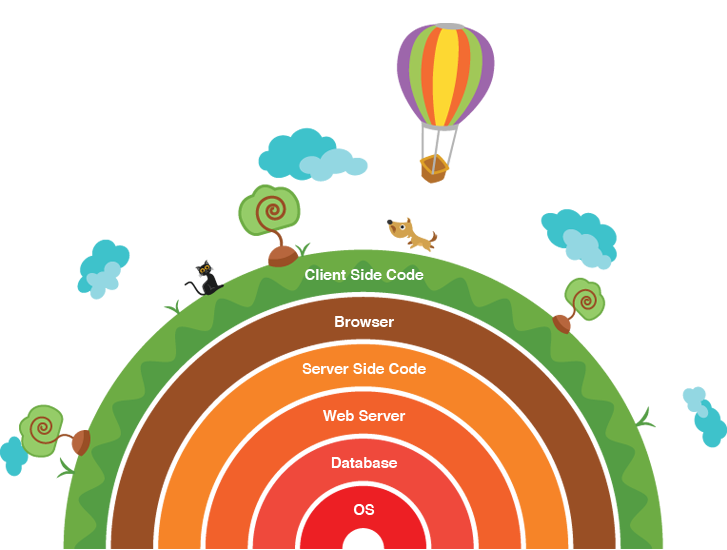
As shown in the figure, there are many technology stacks. The things inside those technology stacks are as follows.

System Administration

1.       Linux and basic shell scripting
2.       Cloud computing: Amazon, Rackspace, etc.
3.       Background processing: Gearman, Redis
4.       Search: Elasticsearch, Sphinx, Solr
5.       Caching: Varnish, Memcached, APC / OpCache
6.       Monitoring: Nagios

Web development tools

1.       Version control: Git, Mercurial, SVN
2.       Virtualization: VirtualBox, Vagrant, Docker

Back end tech

1.       Web servers: Apache, Nginx
2.       Programming language: PHP, NodeJS, Ruby
3.       Database: MySQL, MongoDB, Cassandra, Redis, SQL / JSON in general

Front-end tech

1.      HTML / HTML5: Semantic web
2.       CSS / CSS3: LESS, SASS, Media Queries
3.       JavaScript: jQuery, AngularJS, Knockout, etc.
4.       Compatibility quirks across browsers
5.       Responsive design
6.       AJAX, JSON, XML, WebSocket

Design

1.      Converting website design into front-end code
2.       UI
3.       UX

Mobile

1.       iOS
2.       Android
3.       Windows mobile
4.       Hybrid: PhoneGap, Appcelerator

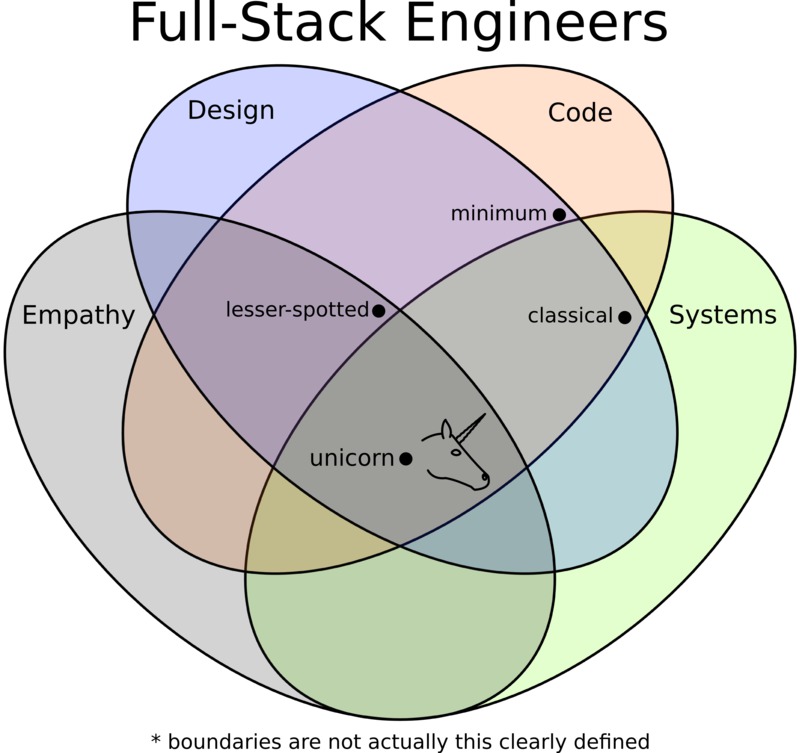
The unicorn


To be a full stack developer you should have empathy in you. That is you have to be able to see in some other person’s view. You need to have creativity and ability to plan. So that you have the design skills. Obviously you have to code. That includes building the software, version controlling, testing etc. apart from those systems knowledge should be there for storing, accessing and transferring data.
All these disciplines make you a successful full stack developer; a unicorn!

Be a full stack developer or not?

For a full stack developer, it is not needed to specialize one thing. That is not possible as he/she is an all-rounder. But should be comfortable with all the technologies to work with. To be comfortable in every technology is also kind of being an expert.

Kashumi Madampe
CIS 2010/2011
kashumi91@gmail.com


iOS Development Beginner Tutorial 3 - Working With Storyboard

In this iOS Development Tutorial let's go deep into the Storyboard concept that Apple introduced few years ago.
Let's create a new project & here you can see the default Storyboard screen.


You can change the default Storyboard to your custom created Storyboard in Project Settings --> General Tab --> Main Interface


If you are going to create an App with only Single screen you can use this default screen as your single screen. But most of the times you will end up with so many screens in the app. To Navigate through those screens iOS Apps have 2 default ways. They are,


  • Navigation Controller
  • Tab Bar Controller
Here is an example of Navigation Controller in iOS.
 
 
 Here is an example of Tab Bar Controller in iOS.


Now you have an idea of what are those Controllers. Let's implement Navigation Controller first in our sample App.
Select the ViewContoller View you want to add Navigation Controller & then go to Editor in the Menu bar & select Embed In.  Now you can see both Navigation Controller & Tab Bar Controller. Select Navigation Controller from there.


Now you can see Xcode automatically creates the Navigation Controller for you.
To Show you how Navigation Controller works, I'm going to add a new ViewController to the StoryBoard. You can easily add a ViewController by drag & drop a new ViewController from here.


And then I'm going to change both ViewController Background colours.


Then I'm going to add a Button to the 1st ViewController & when I touch that Button I want to navigate to the 2nd ViewController.
 
 
To setup the navigation Press Control on the keyboard & drag the Button to 2nd ViewController. Now you can see a dialog box as follow.
  
In that dialog box select Show. Now you have completed the Navigation controller combination with Storyboard. Here is how it works in the Simulator. 
 
It automatically creates thousands of codes & you just need to put a button to create the navigation. 
Tab Bar also works as same. Let's add a Tab Bar Controller to 2nd ViewContoller. After adding it, the storyboard will look like this.


Let's add 2 more ViewControllers to the storyboard & Now I'm going to add those 2 new ViewControllers to the TabBar Controller. 
 
 
To add new ViewControllers to the TabBar Controller press Control button on the keyboard & drag TabBarController to a new ViewController.
  
In that dialog box select View Controllers. Do the same steps to the next ViewController as well. Now you can see it automatically creates all the connections related to Tab Bar Controller.
 
 
To see this, let's run the project in a simulator. Here you can see, when you navigate to the 2nd ViewController there is a Tab Bar inside the View & you can switch between Views using the Tab Bar.
  
This is how the Navigation Controller & Tab Bar Controller works in Storyboard. If you are not using Storyboard & keen to use XIB, there is a programmatically way of implementing those 2 Controllers as well. I'll discuss about them later in this tutorial series.
 
Dilum BC Navanjana
[CIS 2010/2011]
Associate Software Engineer(iOS), 
Creation Application
dilum@creationapplication.com